Zigbee Hub vs WiFi Smart Home: What Actually Works in Indian Apartments?
WiFi smart devices work fine for 5 devices. At 30, they collapse. Here's why Zigbee hub systems outperform WiFi at scale in Indian apartments.

By Abhi Bavishi
The first smart plug works great. So does the second. By the twentieth, your router starts dropping connections, automations stop firing, and you're rebooting things you never thought you'd reboot.
This isn't bad luck. It's an architectural problem. WiFi and Zigbee are fundamentally different approaches to connecting smart home devices — and the protocol you choose determines how far your system can grow.
Here's what each approach actually does, where each breaks down, and which one makes sense for your home.
WiFi smart devices each eat one slot on your router — and routers run out of slots
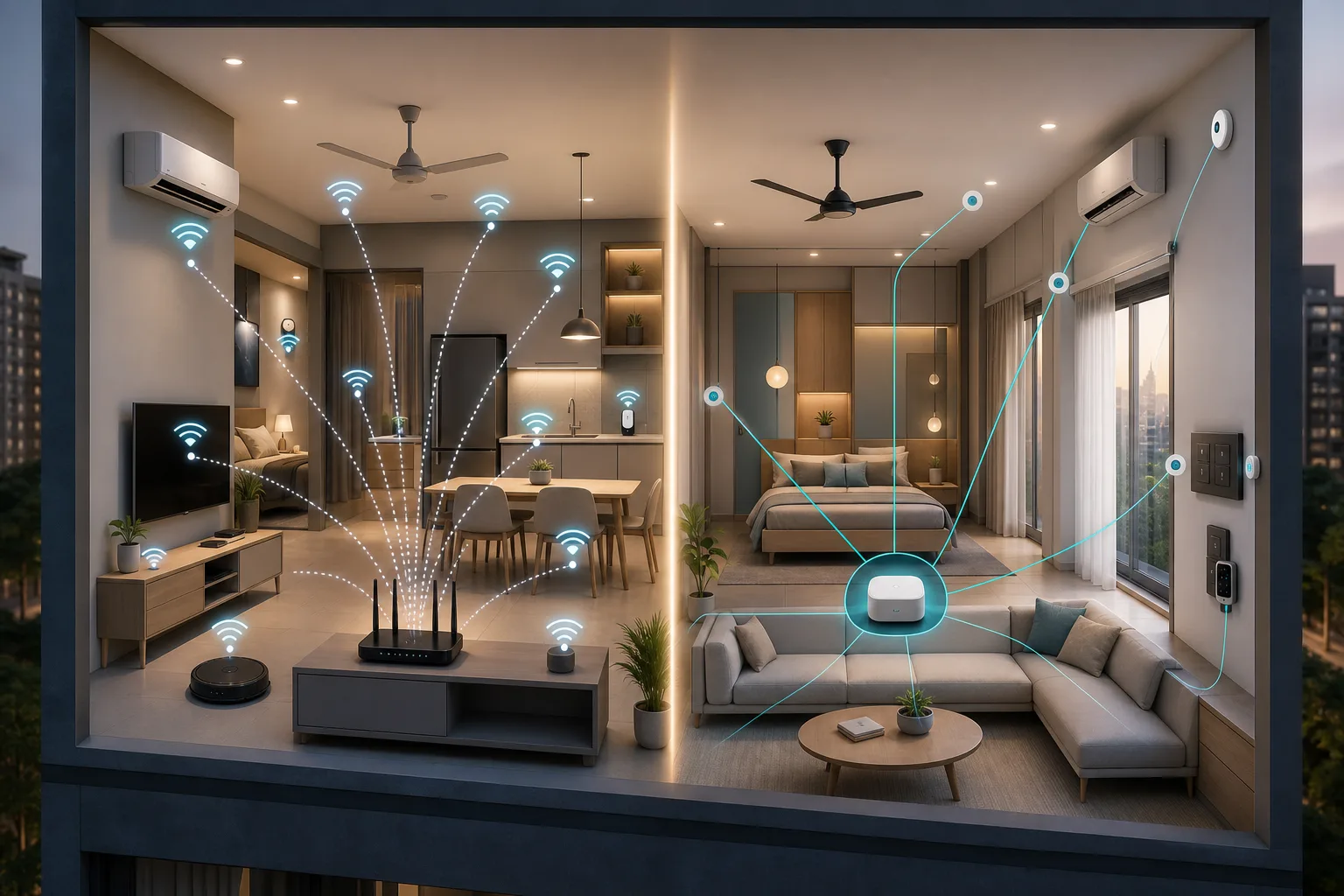
Every WiFi smart device connects to your router the same way your phone or laptop does. Each is a separate client. A typical home router handles 20–30 devices comfortably. Beyond that, connections get unstable, devices drop off, and automations become unreliable.
A fully automated 2BHK has 30–50 smart devices. A 3BHK can easily hit 70. WiFi's per-device model simply wasn't designed for this.
There's also the cloud dependency. Most WiFi smart devices route commands through the brand's cloud server. If the internet goes down, your switches stop responding — even to commands originating inside your own home.
Zigbee devices form their own mesh network — your router only sees one connection
Zigbee devices don't use your WiFi at all. They form a dedicated mesh network among themselves, and a small hub (gateway) bridges that network to your router using a single WiFi connection — regardless of whether you have 10 devices or 200.
Each device also acts as a repeater. The more devices you add, the stronger and more resilient the network becomes. And because the hub processes most commands locally, your lights respond even when Jio is having a bad day.
Zigbee vs WiFi: the numbers
| Factor | WiFi Smart Devices | Zigbee Hub |
|---|---|---|
| Router load | 1 client per device | 1 client total (the hub) |
| Max reliable devices | ~20–30 | 65,000 |
| Latency | 100–500ms (via cloud) | 10–50ms (local) |
| Works without internet | Usually no | Yes |
| Signal through concrete | Poor to moderate | Good (short mesh hops) |
| Setup | Simple, no hub | One hub setup, then easy |
| Hub cost | None | ₹3,000–8,000 (one-time) |
Indian apartments are the worst environment for WiFi smart homes
Reinforced concrete — the default in Indian apartment construction — kills WiFi signals. American and European smart home products are designed for wood-frame buildings. They don't account for the signal loss through a typical Mumbai or Bangalore apartment wall.
Layer on top of that 30–50 competing WiFi networks from neighbouring flats on the same channels. If your WiFi slows down when everyone comes home in the evening, that interference hits every WiFi smart device in your home equally.
Zigbee uses the same 2.4 GHz band but communicates at very low power over short hops between devices — bedroom device to hallway device to living room hub. Each hop is short, each hop is reliable. Concrete walls barely matter.
WiFi is fine for up to 10 devices — Zigbee is necessary beyond that
WiFi smart devices make sense for small setups: a smart plug here, a connected bulb there, a standalone camera. If you're experimenting with 3–5 devices, WiFi is cheaper and simpler to start.
But the moment you want to automate a full room — lights, fan, curtains, and a motion sensor — you're at 6–10 devices per room. A full 2BHK puts you at 30–50. That's Zigbee territory.
You also want Zigbee if:
- Your home has weak WiFi in bedrooms or far rooms
- You want automations that keep working during internet outages
- You want switches that respond instantly — not after a 300ms cloud round-trip
- You want one app for everything instead of four brand apps
Most homes end up using both — and that's fine
Zigbee handles switches, sensors, panels, and dimmers — the backbone of the home. WiFi handles devices that are inherently cloud-connected anyway: cameras, video doorbells, smart TVs.
Smartify installations typically follow this hybrid. Zigbee for everything you touch and automate. WiFi for everything you stream and watch. You get reliability where it matters and simplicity where it doesn't.
Start with Zigbee if you're serious about whole-home automation
For anything beyond a handful of devices, Zigbee hub-based systems are more reliable, faster, and more scalable — especially in Indian apartments. The hub costs a bit upfront, but it's what makes the rest of the system actually work.
Calculate what a Zigbee smart home costs for your home size, or book a free consultation to see it in action.
Frequently asked questions
Do I need a hub for Zigbee devices?
Yes. Zigbee devices can't connect to your WiFi directly — they need a Zigbee hub (gateway). Most systems include one hub that manages all your devices. Some platforms like Aqara include the hub with their starter kits.
Can Zigbee and WiFi devices work together in the same home?
Yes. A Zigbee hub connects to your WiFi router, so your phone controls both Zigbee and WiFi devices through a single app. Most smart home apps support both protocols simultaneously.
What happens to Zigbee devices if the internet goes down?
Local automations and manual control continue working because the hub processes commands on your home network. You lose remote access (controlling from outside) until internet is restored.
Is Zigbee better than WiFi for Indian apartments specifically?
For whole-home automation, yes. Thick concrete walls and dense neighbour WiFi networks make the Zigbee mesh architecture significantly more reliable than per-device WiFi in most Indian apartment buildings.